2023 Ford Expedition Owner’s Manual — Changing the Remote Control Battery - Vehicles With: Flip Key
Keys and Remote Controls
 WARNING: Keep batteries away from children to prevent ingestion. Failure to follow this instruction could result in personal injury or death. If ingested, immediately seek medical attention. WARNING: If the battery compartment does not securely close, stop using the remote control and replace it as soon as possible. In the meantime, keep the remote control away from children. Failure to follow this instruction could result in personal injury or death. WARNING: Keep batteries away from children to prevent ingestion. Failure to follow this instruction could result in personal injury or death. If ingested, immediately seek medical attention. WARNING: If the battery compartment does not securely close, stop using the remote control and replace it as soon as possible. In the meantime, keep the remote control away from children. Failure to follow this instruction could result in personal injury or death. |
Battery Replacement Procedure
The remote control uses one coin-type 3-volt lithium battery CR2032 or equivalent.
Press the button to release the key blade before beginning the procedure.
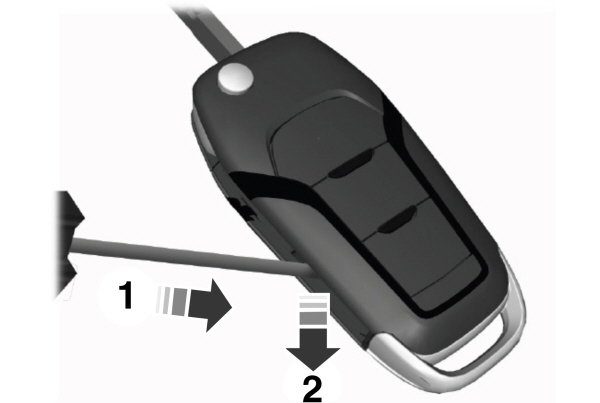
- Insert a screwdriver, in the position shown and gently push the clip.
- Press the clip down to release the battery cover.
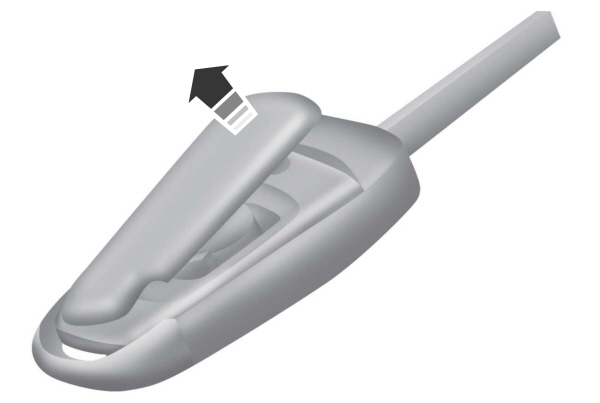
- Carefully remove the cover.
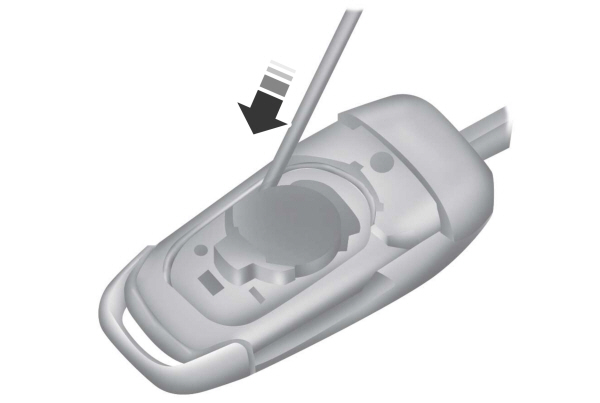
- Insert a screwdriver as shown to release the battery.
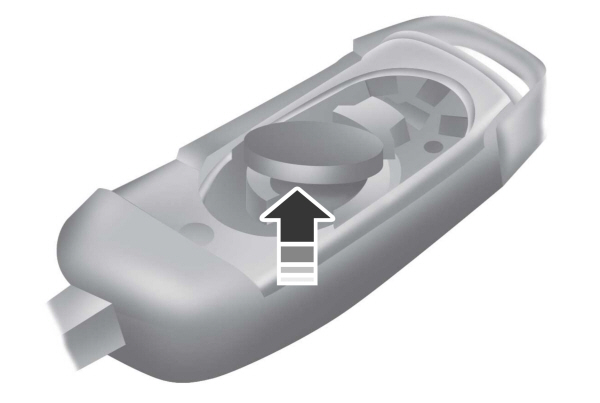
Note: Do not touch the battery contacts or the printed circuit board with the screwdriver.
- Remove the battery.
- Install a new battery with the + facing up.
- Replace the battery cover.

Note: Do not wipe off any grease on the battery terminals or on the back surface of the circuit board.
Note: Replacing the battery does not erase the programmed key from your vehicle.The remote control should operate normally.
Stored owner’s manualImported HTML from the shared Autotk manuals tables. Not an official Toyota site.